


Your Shopify developer is just using Claude for everything.
TL;DR
You can build and run your Shopify store with Claude Code, and you do not need a developer.
The 10 steps below take you from a free practice store to new pages on your real store.
Each step has a prompt that you copy into Claude.
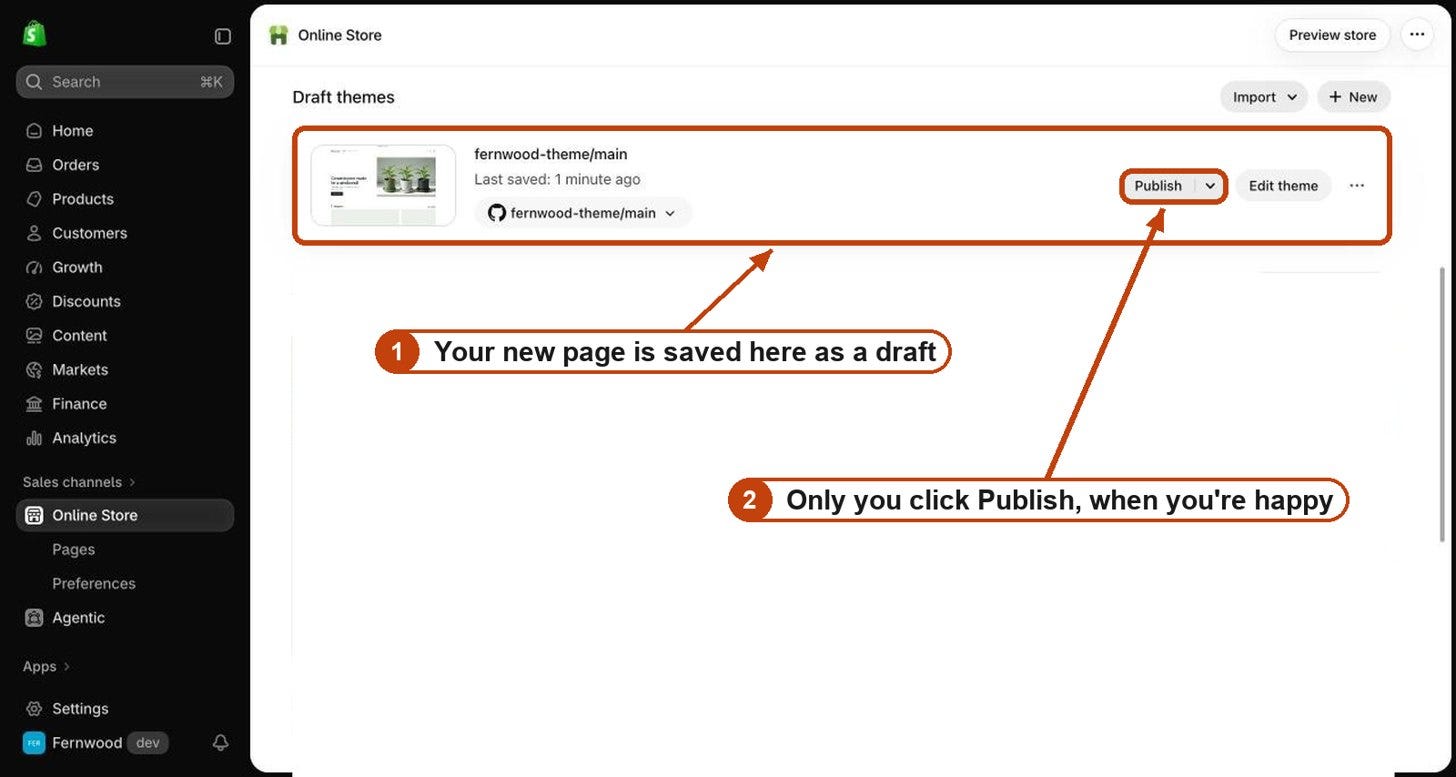
Nothing goes live until you say so, because Claude makes every change on a draft theme.
OR, you can just use my recipe which does all 10 steps for you once you paste it into ClaudE Code, and you have to be paid subscriber to get it.
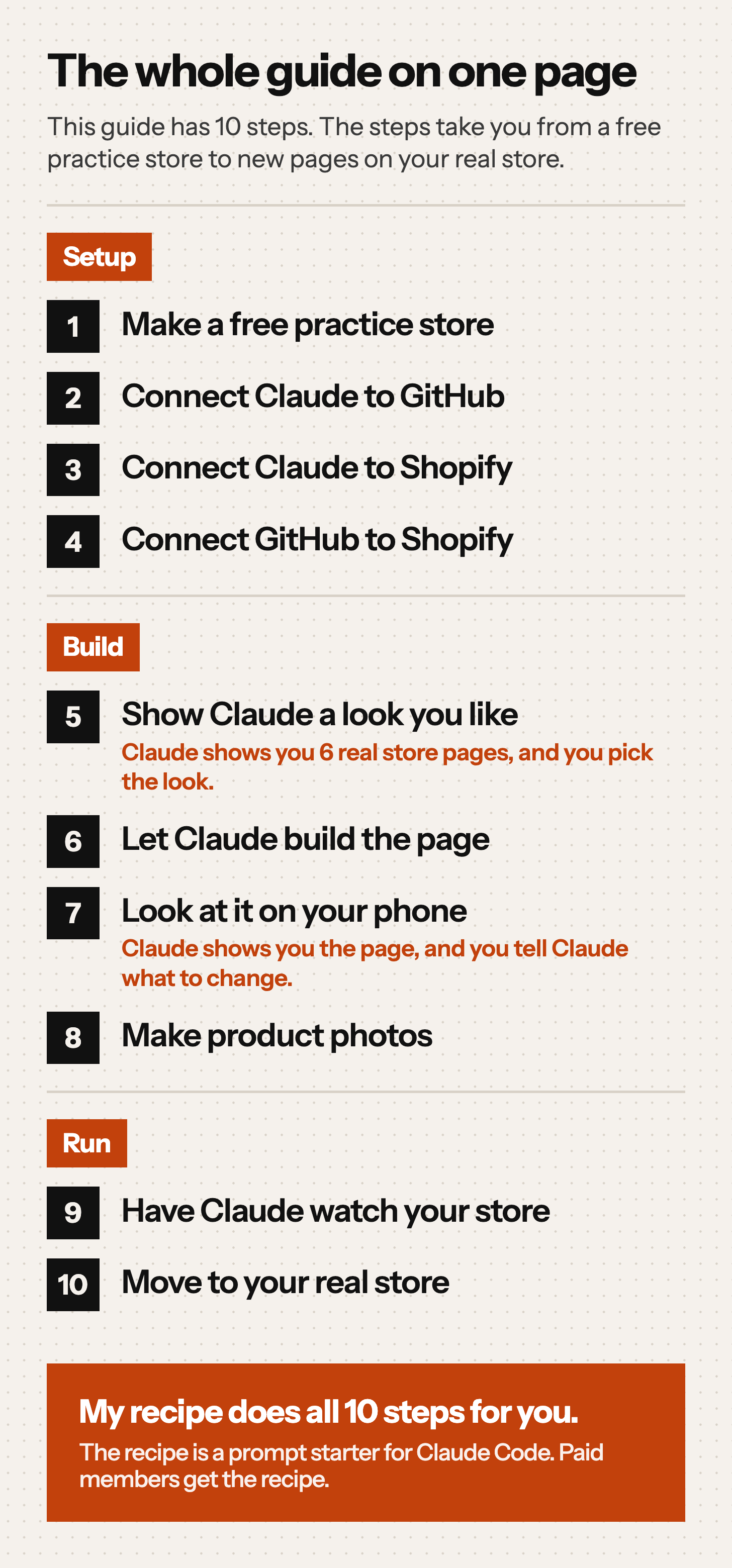
You can do all 10 steps below yourself for free, or you can let my recipe do all of them for you. The recipe is a prompt starter for Claude Code. Claude reads the recipe and does all 10 steps, from the practice store to your real store. You only answer yes or no when Claude asks. Paid members get the recipe.
At times I've had a Shopify developer who's on staff, whether that's an internal person or an external resource, but now with Claude Code it's very easy to hit a style guide, make a new landing page, and then push it to GitHub and merge it to main. I literally have made entire Shopify sites in the last year just with Claude, and I have zero need for a developer whatsoever.
So here's the build recipe. I'm going to show you how to do this yourself, each step on your own.
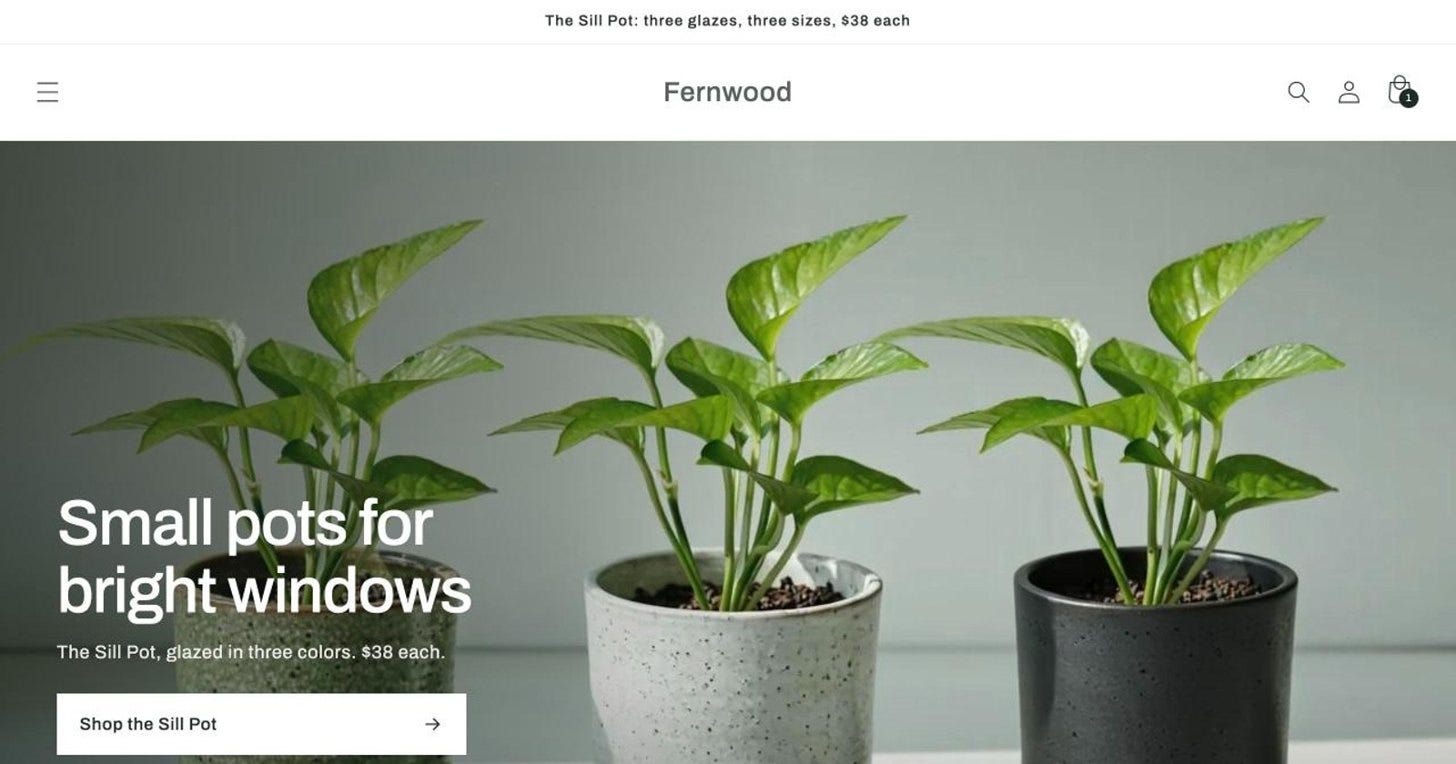
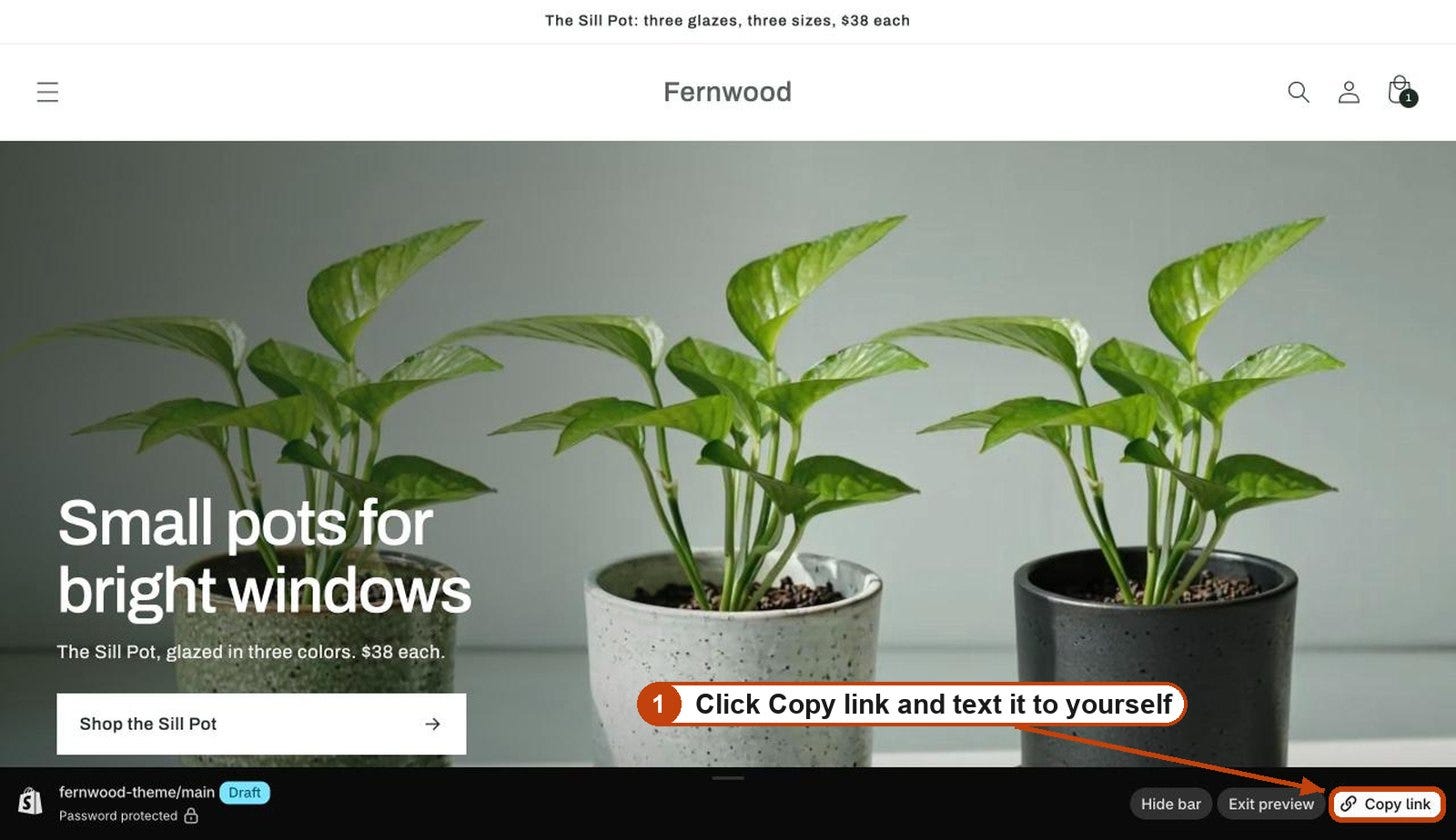
Here's a page it built for Fernwood, a brand I made up for the test.
How we got here
You used to pay a developer for every change to your store, and now Claude does that work, so the hard part is deciding what to build.
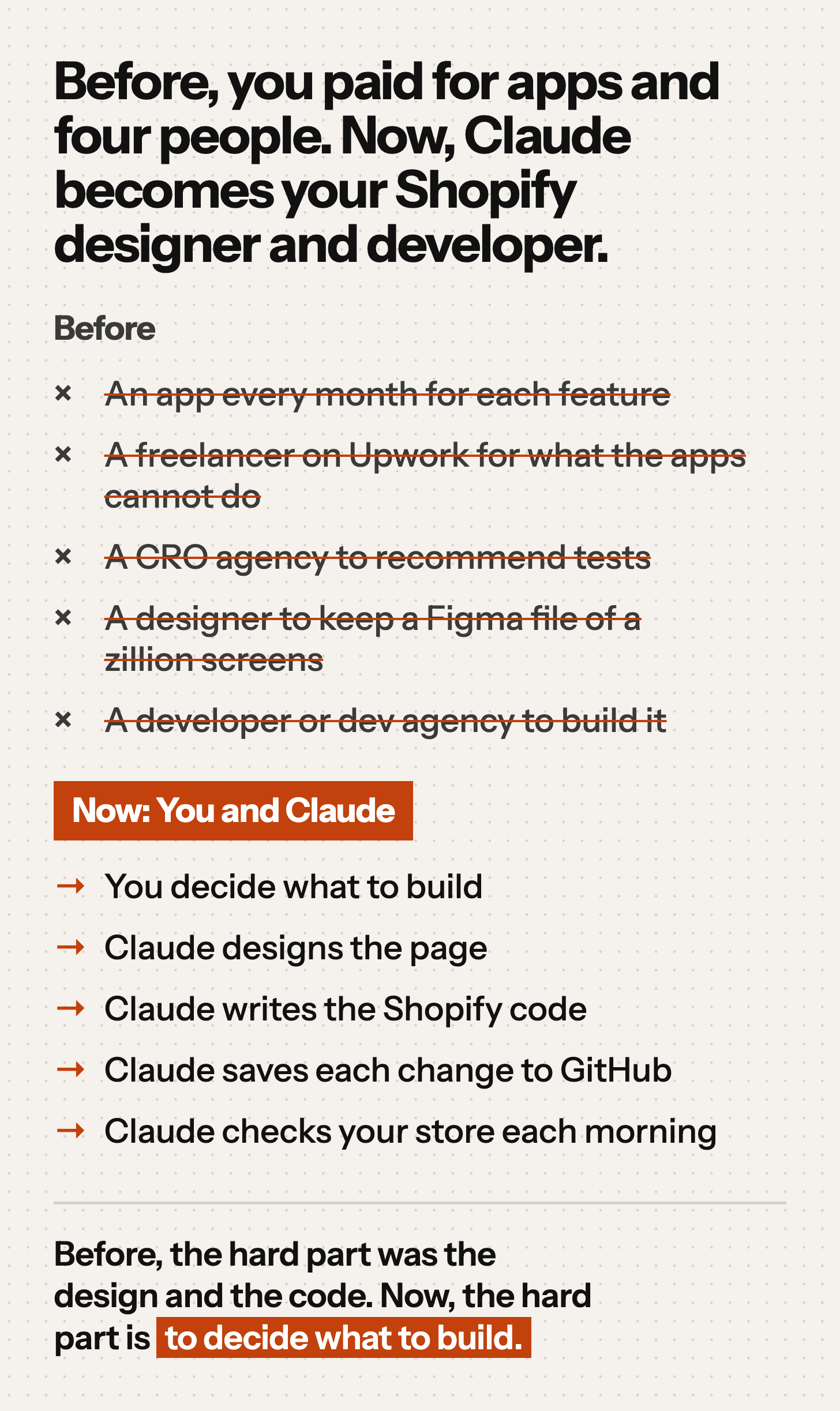
So I've been doing this for 17 years, and building a Shopify store used to be really hard. Now you can do most of it yourself, and honestly a lot of store owners still don't know it. Back then your store was on a theme written in Liquid, Shopify's coding language, and if the theme didn't have it, you paid someone who knew Liquid.
Maybe you were running the store by yourself on a tight budget. So every time you needed a feature you'd pay for another app every month, and then whatever the apps couldn't do, you'd go find somebody on Upwork. And you couldn't really see what they changed, so you'd just kind of hope it didn't break something else on the site.
Or maybe you had a bigger budget and you were the one who answered for growth. So you had a CRO agency, a designer keeping everything on brand with a Figma file with a zillion screens, and a developer or dev agency building it. And the CRO agency recommends a test, the developer says it can't be built that way, and the designer says it's not on brand. So then I'm refereeing all week, and some quarters nothing new got tested at all.
ChatGPT came out in November 2022, and I don't remember a single developer bringing it up. In 2023 and 2024 maybe you pasted some code from ChatGPT into your theme, and sometimes it worked and sometimes it broke a page and you paid the developer to fix it. And by 2025 you'd heard your developer was using AI, but you couldn't tell good code from bad, so you just kept on going business as usual, your developer knew best...
Then in April 2026 Shopify released an AI toolkit for Claude Code and the other AI coding tools. Design, development, email, search, all stuff we've been paying people monthly to help with, I can now do all of those. One developer I know told me his business is almost fully shut down now that everyone's just using Claude or ChatGPT to implement liquid code and using Claude Design to make pages for them.
Some developers have adjusted. They started acting like the designer and the CRO person too, and some of them cut their prices, and honestly those devs are worth keeping. Others size you up first, and if you sound like you still think the Shopify dev is hard, you get the 2021 price.
I think the hard part is different now. It used to be designing and developing in Shopify, and now it's deciding what to build. Every category is different, like supplements need dosage and subscribe by the price and furniture needs dimensions and room photos. And you can't tell from the outside which of your competitors' pages actually convert.
So yeah, once you know you can build it yourself, I wouldn't be paying for design and engineering anymore. I'd be paying for someone to tell me what's converting in my category and what to test next - or just be that person too..
Before you start
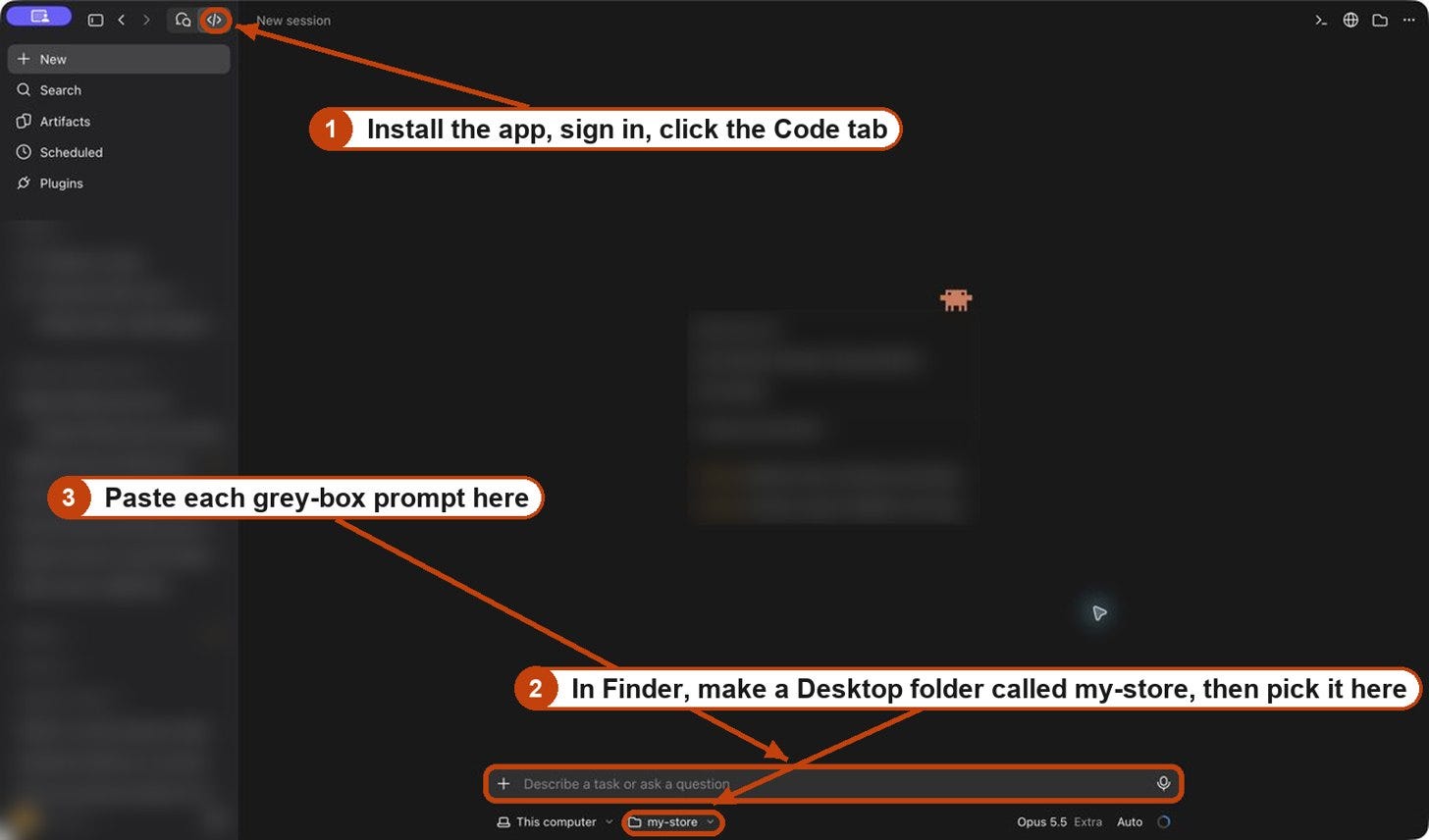
You need the Claude desktop app and to set up one folder for your Shopify store.
There are a lot of advantages to having the Claude desktop app running all of your projects, and if you're on the browser right now, you need to download the desktop app to do what I’m gonna show below. Set up a local folder and name it after your brand or make one just for “Shopify Dev”, and then you can sync and not lose stuff (later I’ll show you how to sync it to Github too so you have the code stored privately in the cloud and you can roll back to previous versions easily.)
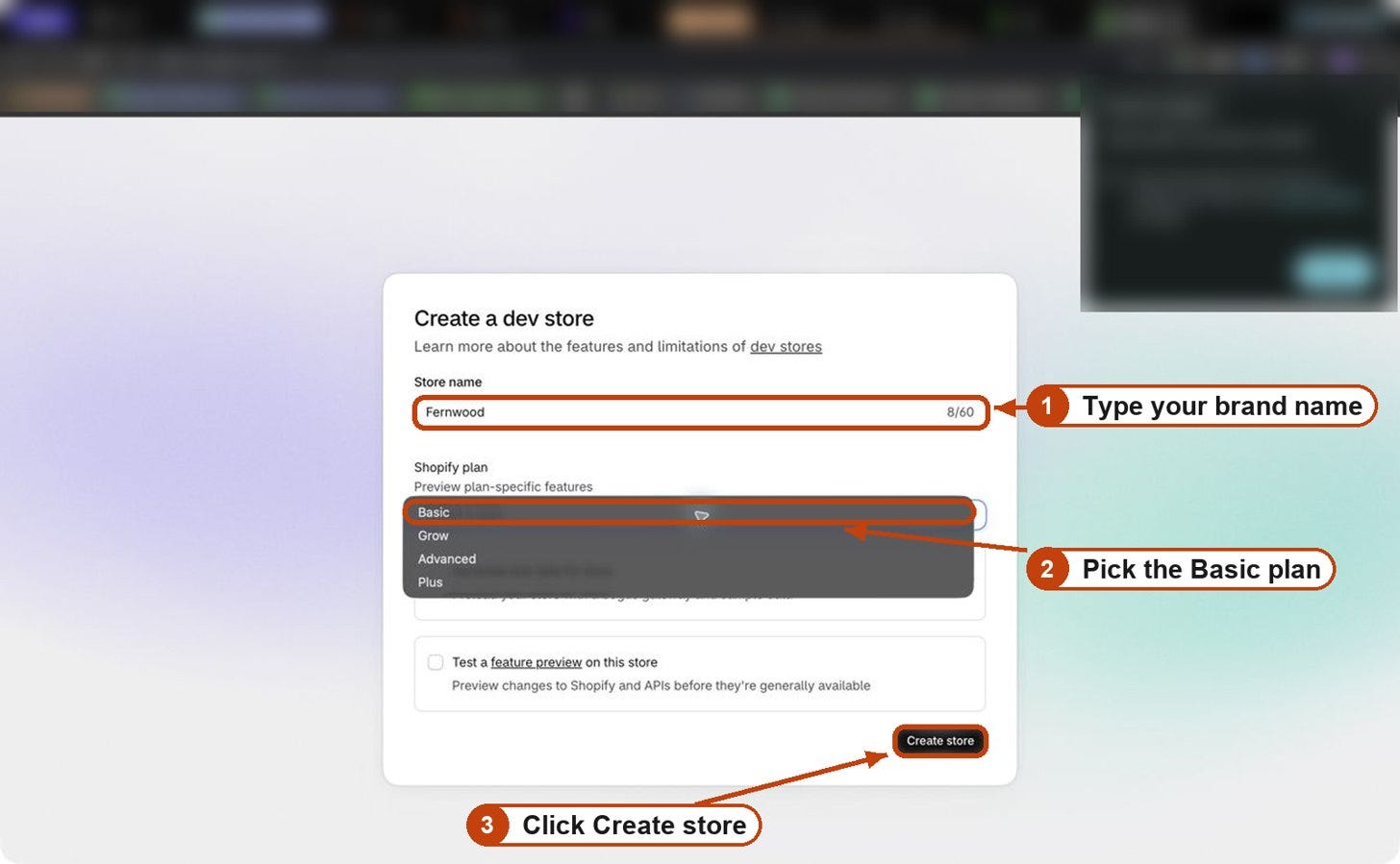
Step 1. Make a free practice store
You should make a free Shopify store to practice on, so nothing you try can break your real store. I’ll show you below or use the prompt.
Just drop this into Claude:
Walk me through making a free Shopify practice store at dev.shopify.com one click at a time. If I need a Shopify account first, tell me how to make one. Tell me what to name the store and which plan to pick, and when it's done, tell me where on my screen to find its myshopify.com address and have me paste it here. Whenever you ask me to Allow something, tell me in one line what it does first.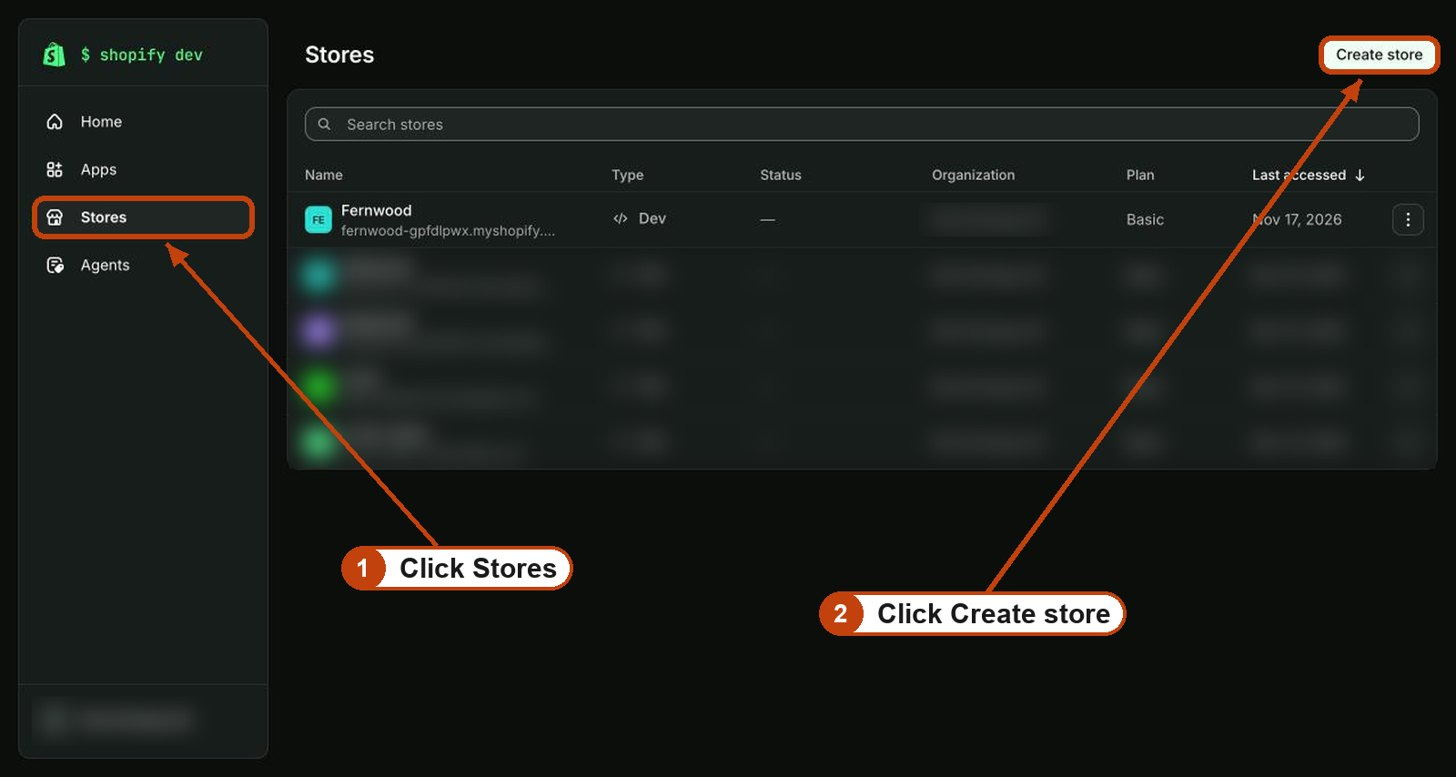
Step 2. Connect Claude to GitHub
This is the step where you make a private GitHub copy of your theme, so every change Claude makes is saved and can be undone.
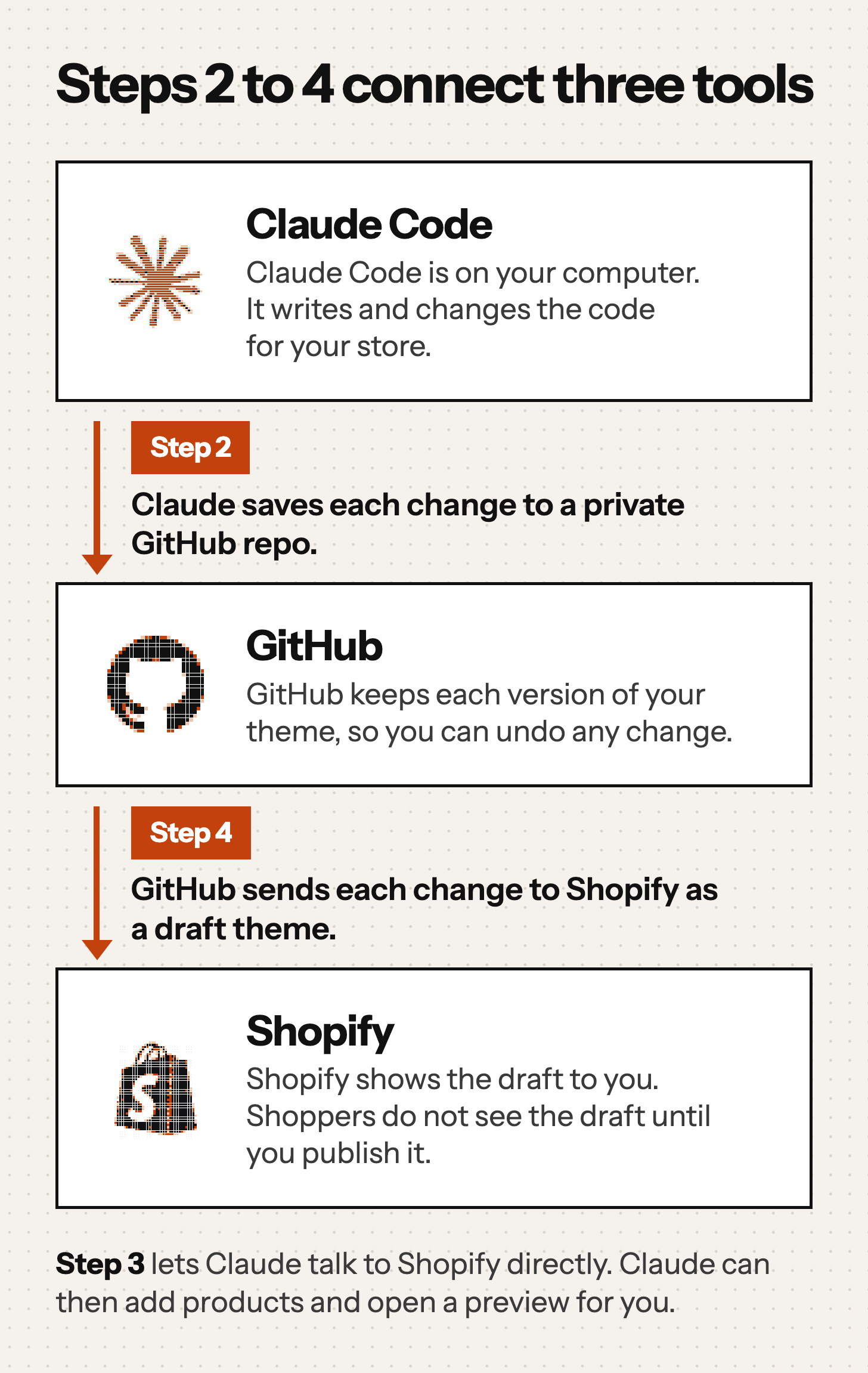
The whole Shopify code is on GitHub. When a developer makes updates, they push it to GitHub, and then that updates the GitHub repo.
Just drop this into Claude:
If I don't have a GitHub account, walk me through making a free one at github.com first. Then sign me in to GitHub and make a private repo for my Shopify theme, starting from Shopify's free Dawn theme. Tell me what each screen is asking me to do. Install anything you need yourself, and tell me in one line what each Allow does before I click it. If my Mac shows its own pop-up or asks for my Mac password while you install things, tell me what it is and wait for me.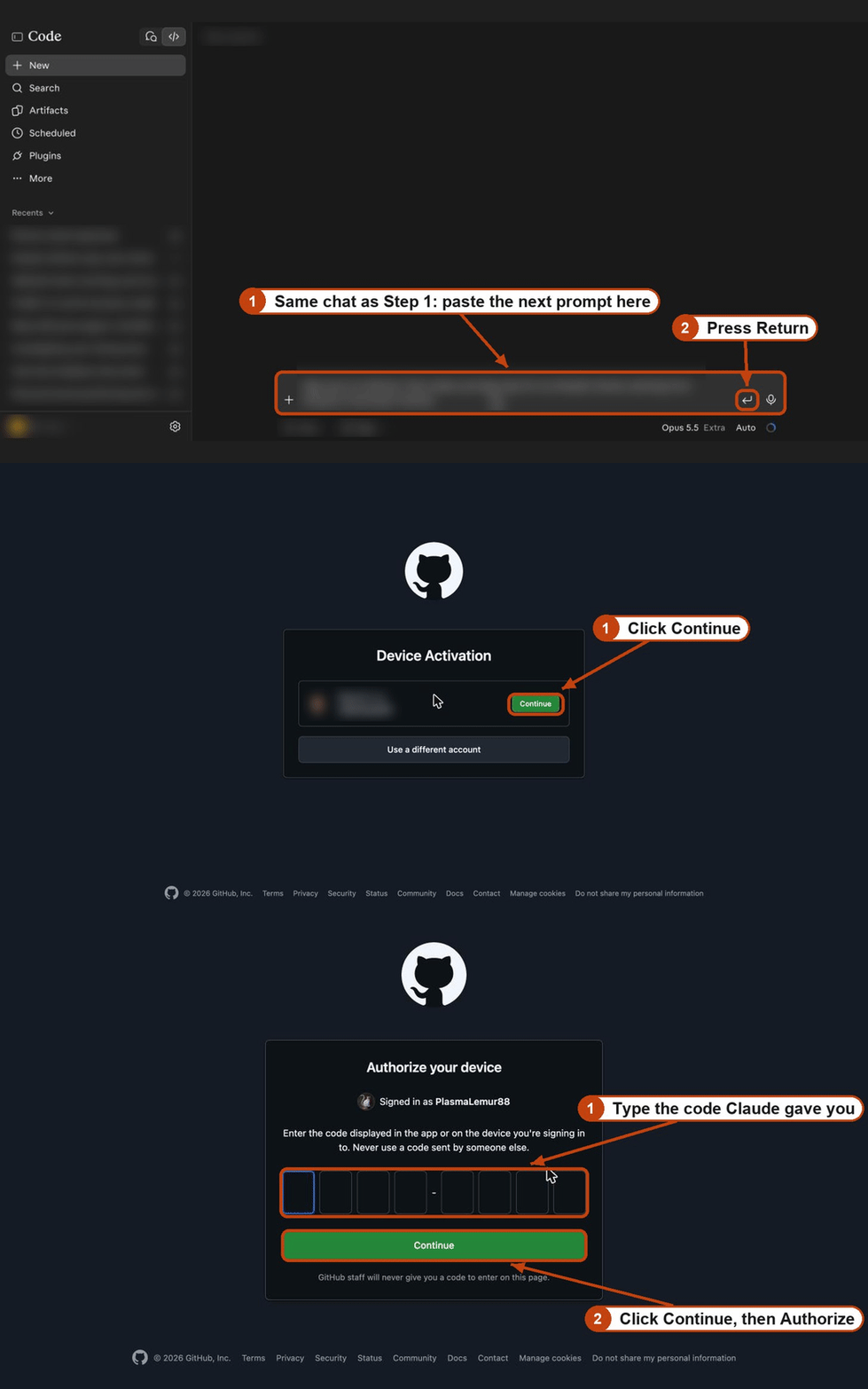
If you don’t want to read all this, then no prob, my recipe does all 10 steps in this post for you. The recipe is a prompt starter for Claude Code, and if you pay and become a paid subscriber to my substack.. I’ll send you the recipe that does all this for you.
Step 3. Connect Claude to Shopify
Claude can now read and change your practice store for you.
Last week I made an entirely new Shopify site with the Shopify CLI.
Just drop this into Claude:
Connect to my Shopify practice store at [the myshopify.com address from Step 1] with the Shopify CLI. Install anything you need yourself. Ask me to say ready before you open the approval page, and tell me to check that the code on that page matches the one you show me.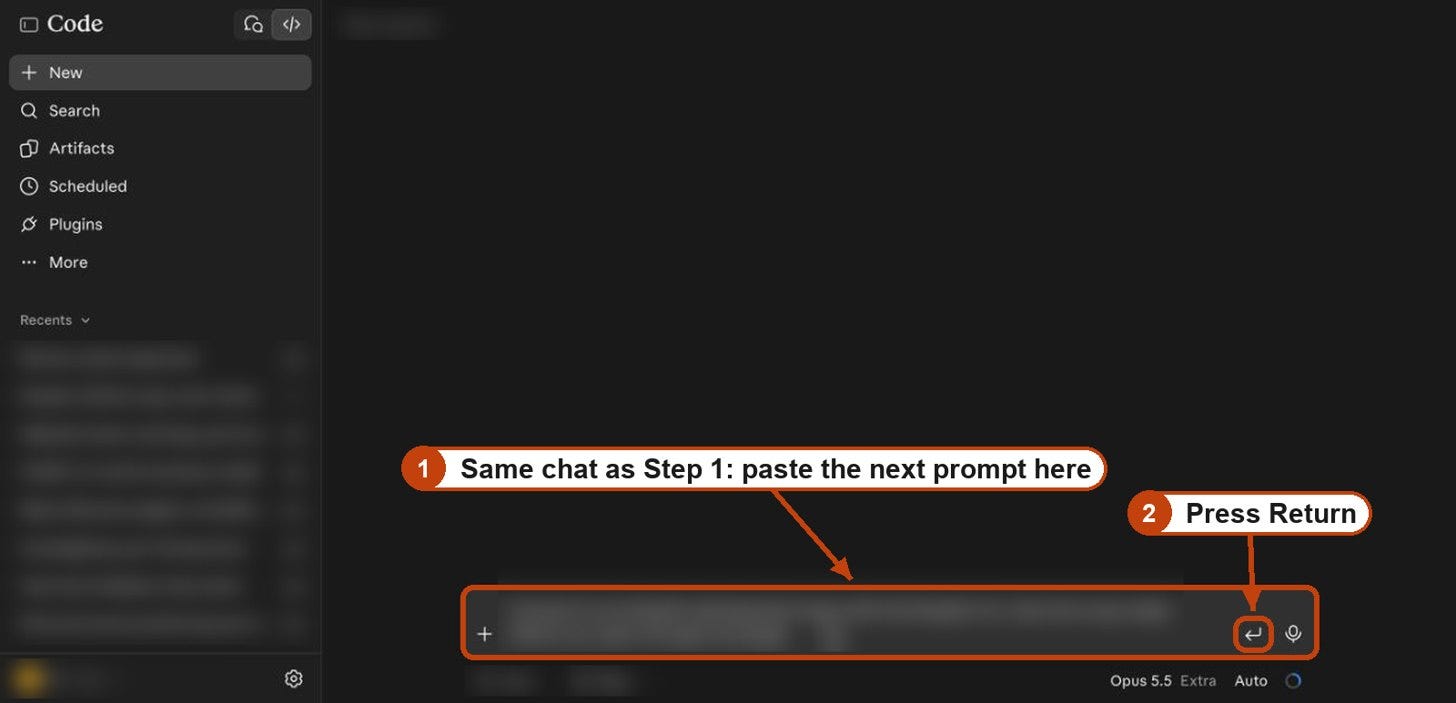
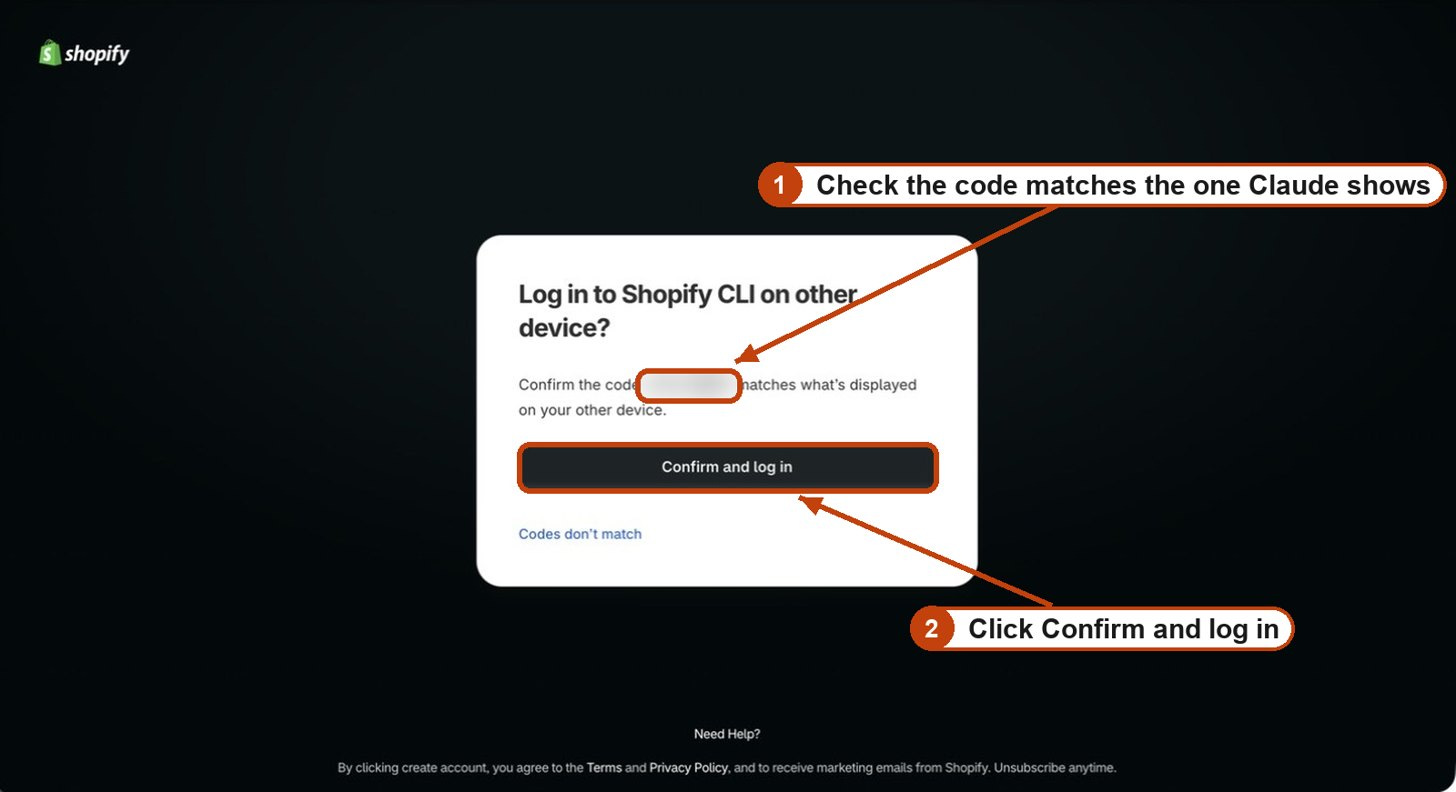
Step 4. Connect GitHub to Shopify
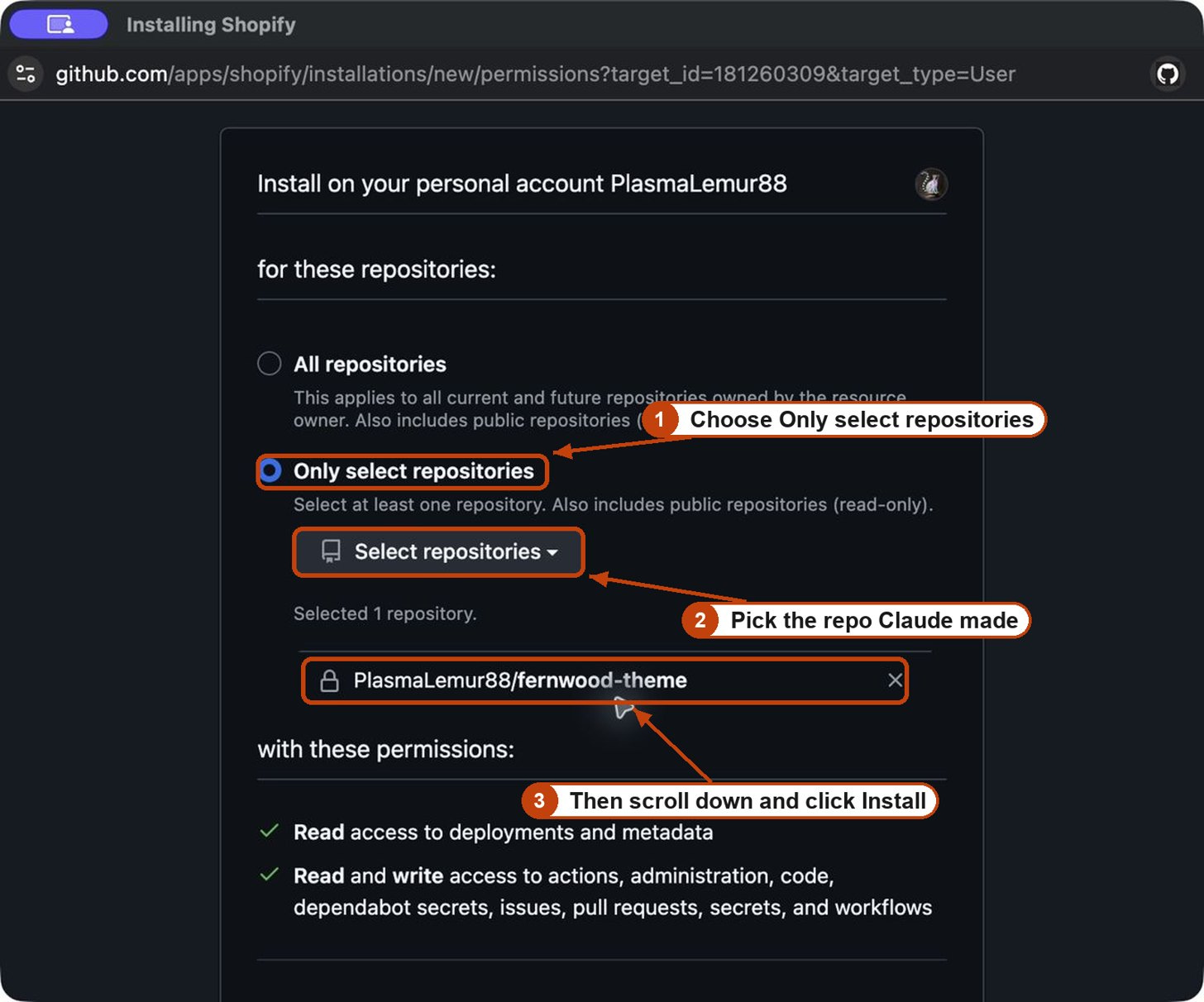
Every change Claude saves to GitHub now shows up in your Shopify store as a draft theme.
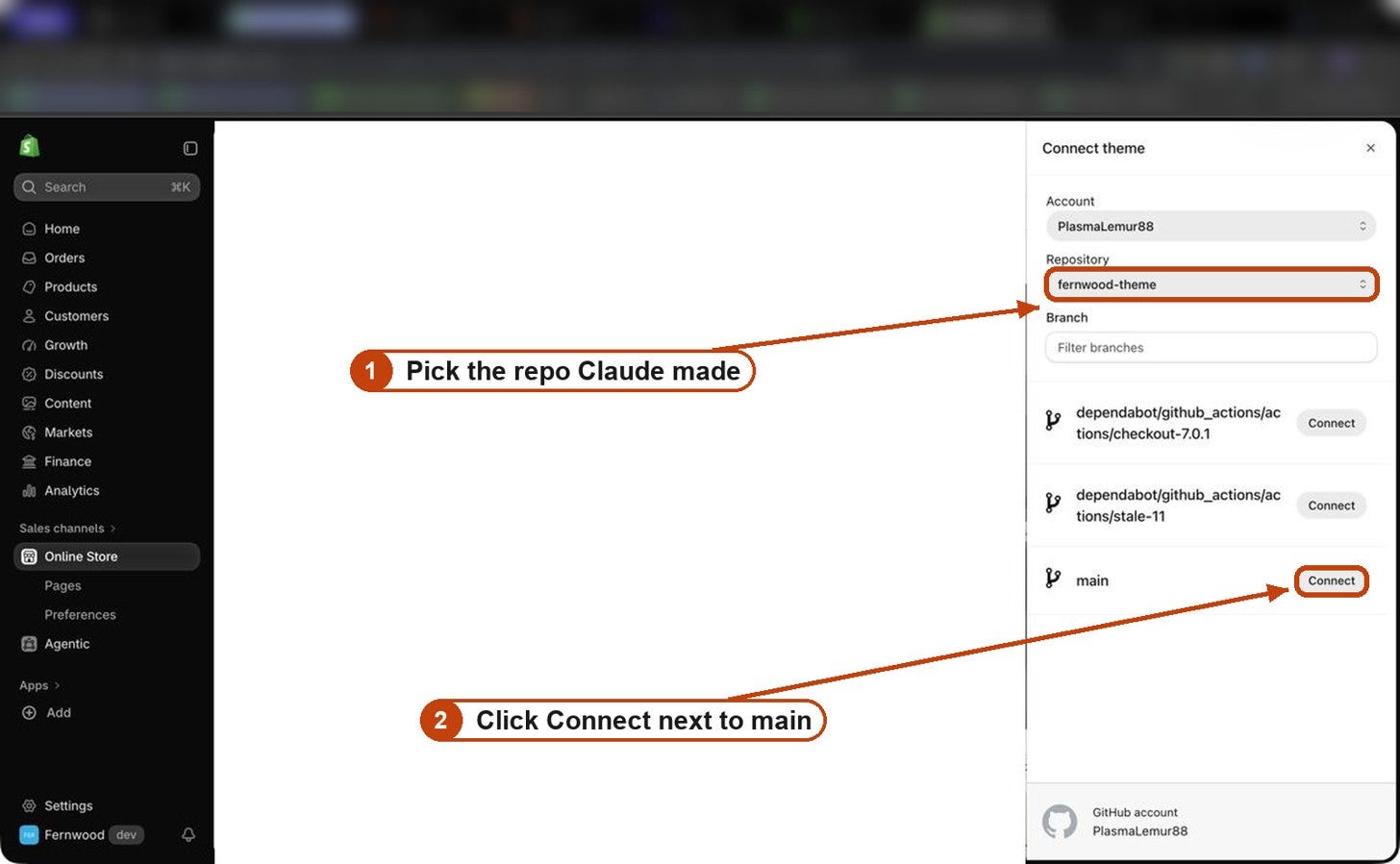
The best practice here is to have a GitHub repo connected to your Shopify. You could have a Shopify store not connected to GitHub, but once it's connected you'll just be able to push landing pages to the GitHub.
Just drop this into Claude:
Walk me through connecting the GitHub repo you made for me to my practice store in Shopify one click at a time. Before anything else, tell me to check that the store name at the bottom left of Shopify is my practice store and not my real store.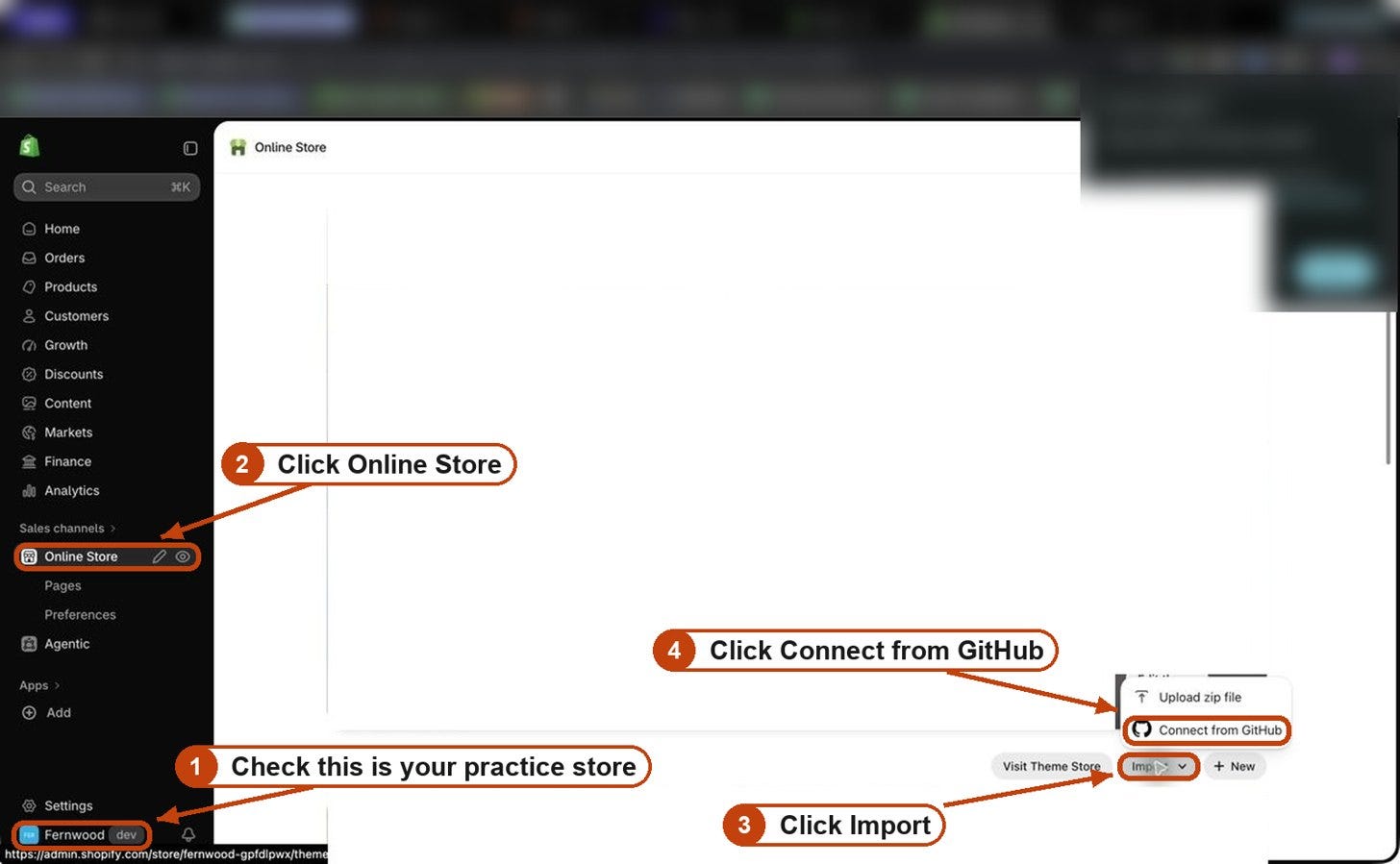
My recipe does all 10 steps in this post for you. The recipe is a prompt starter for Claude Code, and paid members get it.
Step 5. Show Claude a look you like
You get a style guide built from a product page you like, which Claude reads before it designs anything.
Before Claude designs anything, Claude shows you real pages to pick from. Claude finds 6 product pages from stores that got praise in the last 90 days, and you pick one by letter. Claude saves your pick in your taste vault.
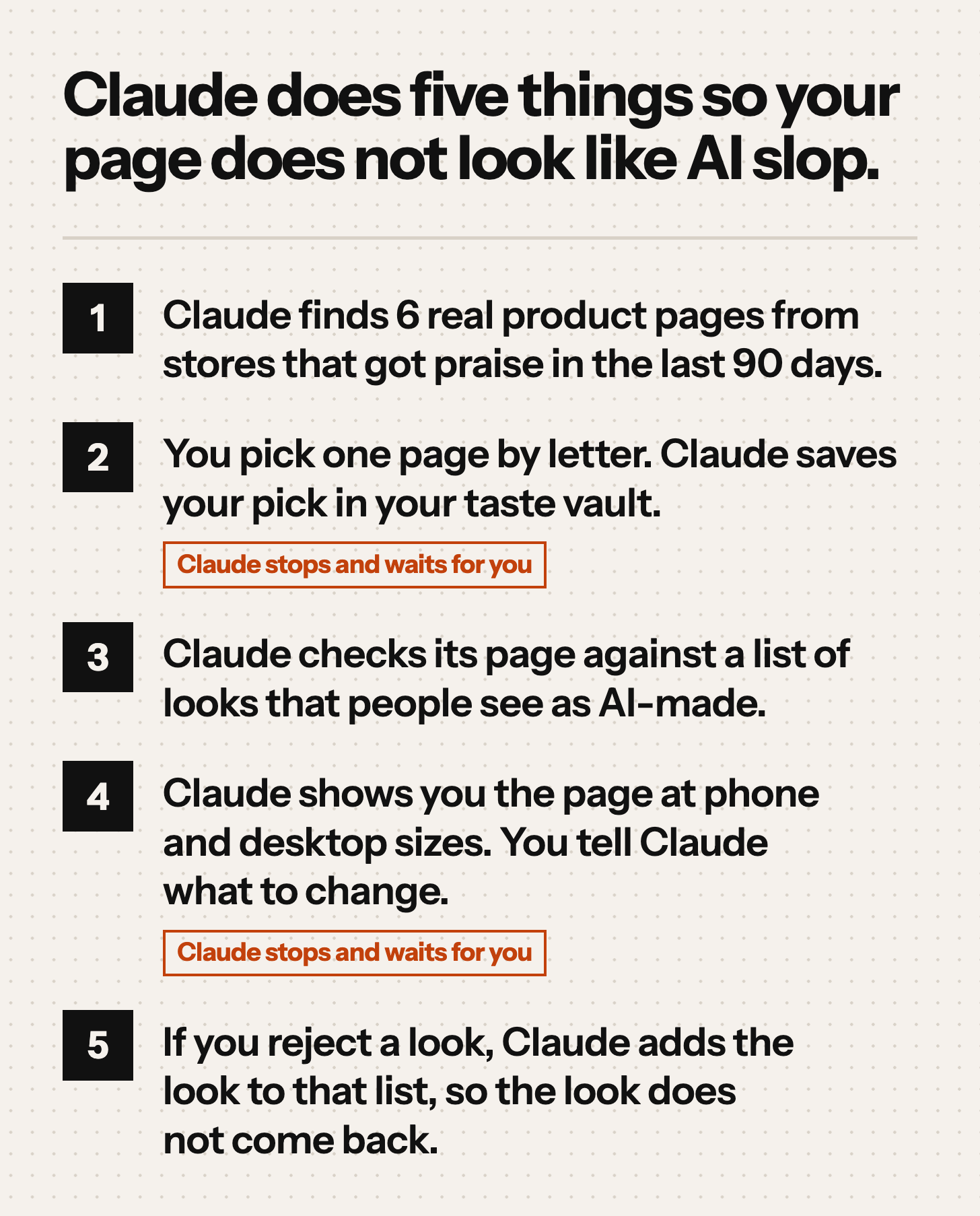
We're very good now with AI content, not making it look like AI slop, but tastefully staying true to what the brand guide has established. The thing I'm thinking about is, do we want to look like a small startup, or do we want to look like we're a 100 million dollar brand? So go find other companies in your space and pick ones that you like, or even other companies that you think could be good. Then you can be like, hey Claude, I want you to use this and kind of adapt it, colors wise and fonts wise, to this brand so that they see it as their brand still, but then you have all the cool UX and spacing and all that. And then over time too, as the brand develops further, you continue to update the assets in the brand guide and then update your style guide.
The one I use is designlang.
Just drop this into Claude:
I don't have a product page I like yet. Show me one picture of six real product pages for [what you sell], from stores praised in the last 90 days, labelled A to F, and tell me to reply with a letter. Then run designlang (github.com/Manavarya09/design-extract) on the page I pick. Install it yourself and ask me before anything that costs money. Open the real page and check its main button color, title size, price size and corner radius yourself, and make me a style guide for my brand, [brand name]. Save my pick in a folder called references with one line on what I liked. That folder is my taste vault, and you read it before you design anything. Take layout ideas only, never a logo, photo or words. Explain any word I might not know.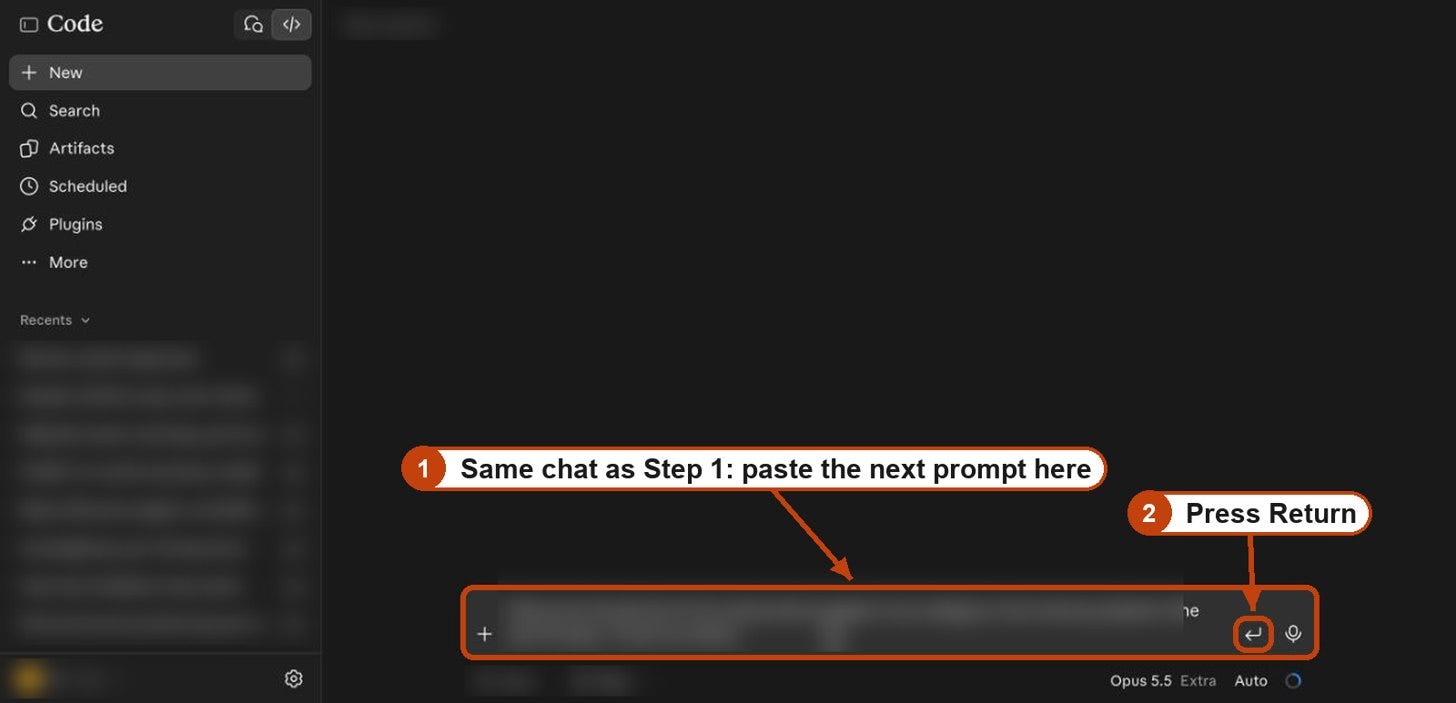
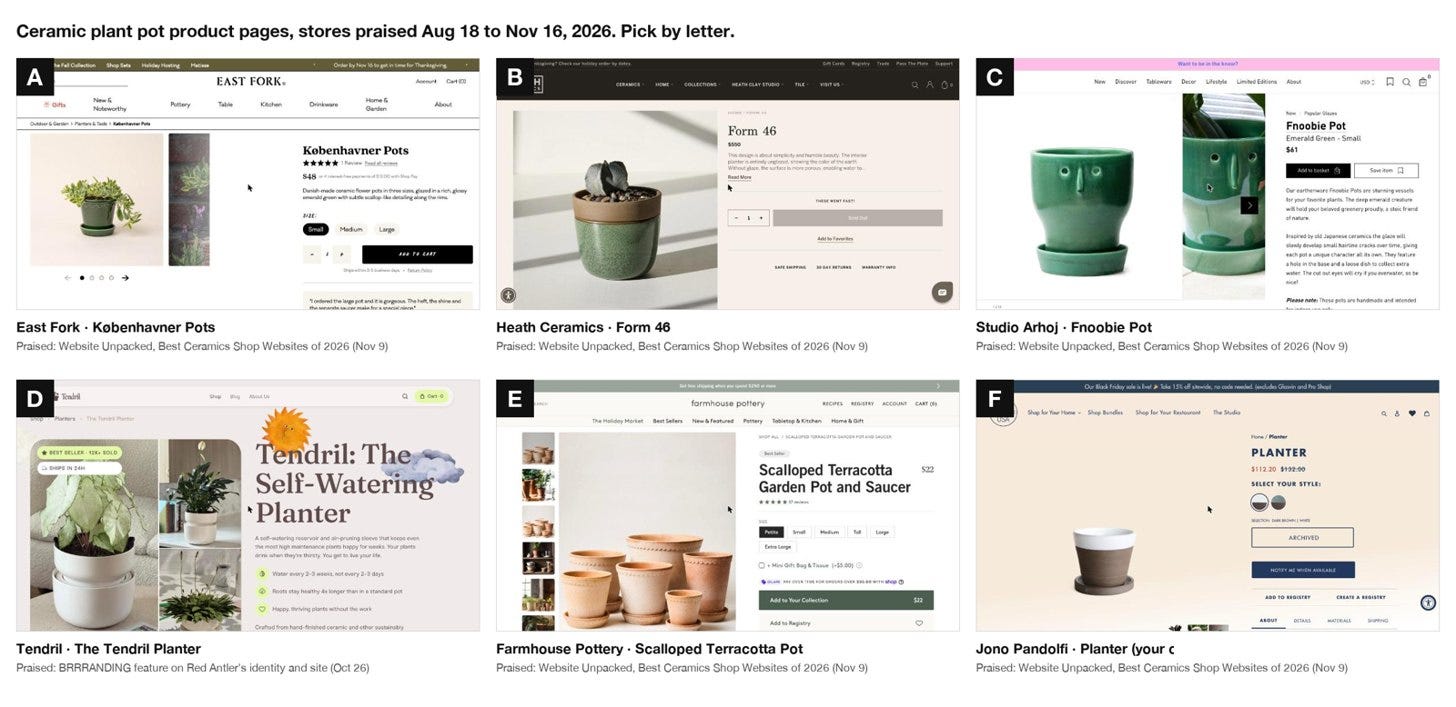
I have a taste vault, and I use the taste vault to come up with a new landing page.
Step 6. Let Claude build the page
Claude builds your product page on a draft theme, and nothing goes live.
Then you can make a draft theme and be like, Claude, go implement all this code on the draft theme. Maybe it gets it onto the Shopify draft theme and you're like, "It doesn't look exactly pixel perfect," so you have to kind of work it to get it pixel perfect, but it should all work. You'll have all the theme editor sections.
Just drop this into Claude:
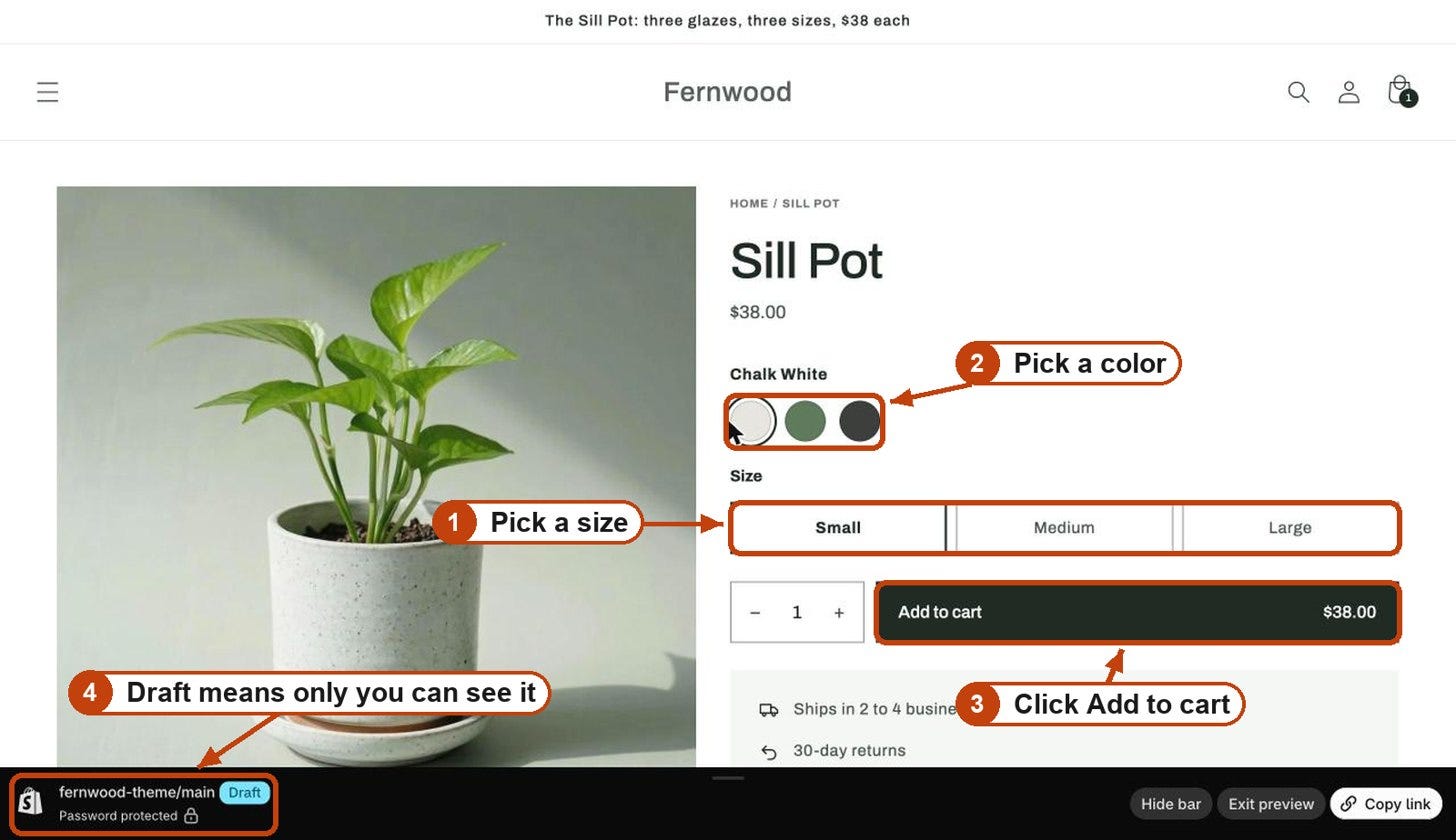
My product is [name], [price], in [colors] and [sizes]. Build the product page from my style guide and my pick, and add the product to my practice store.

We need to condense everything above the fold on the product detail page, especially considering mobile. Add arrows to the gallery images and get rid of the thumbnails that are below. Get the product title onto one line. Make sure the color and size options are above the fold, but that also the Add to Cart is available.

Use these parts:
- Image gallery: swipe with arrows, no thumbnail row, first photo is the color selected
- Title and price on one line each, price also inside the Add to Cart button
- Color swatches and a size selector, with the chosen option written out
- Quantity stepper next to the Add to Cart button
- Sticky add-to-cart bar on phones once the main button scrolls away
- Trust lines right under the button: shipping time, returns, breakage
- Star rating under the title only if real reviews exist, never made up
- Spec table and an FAQ accordion below the fold

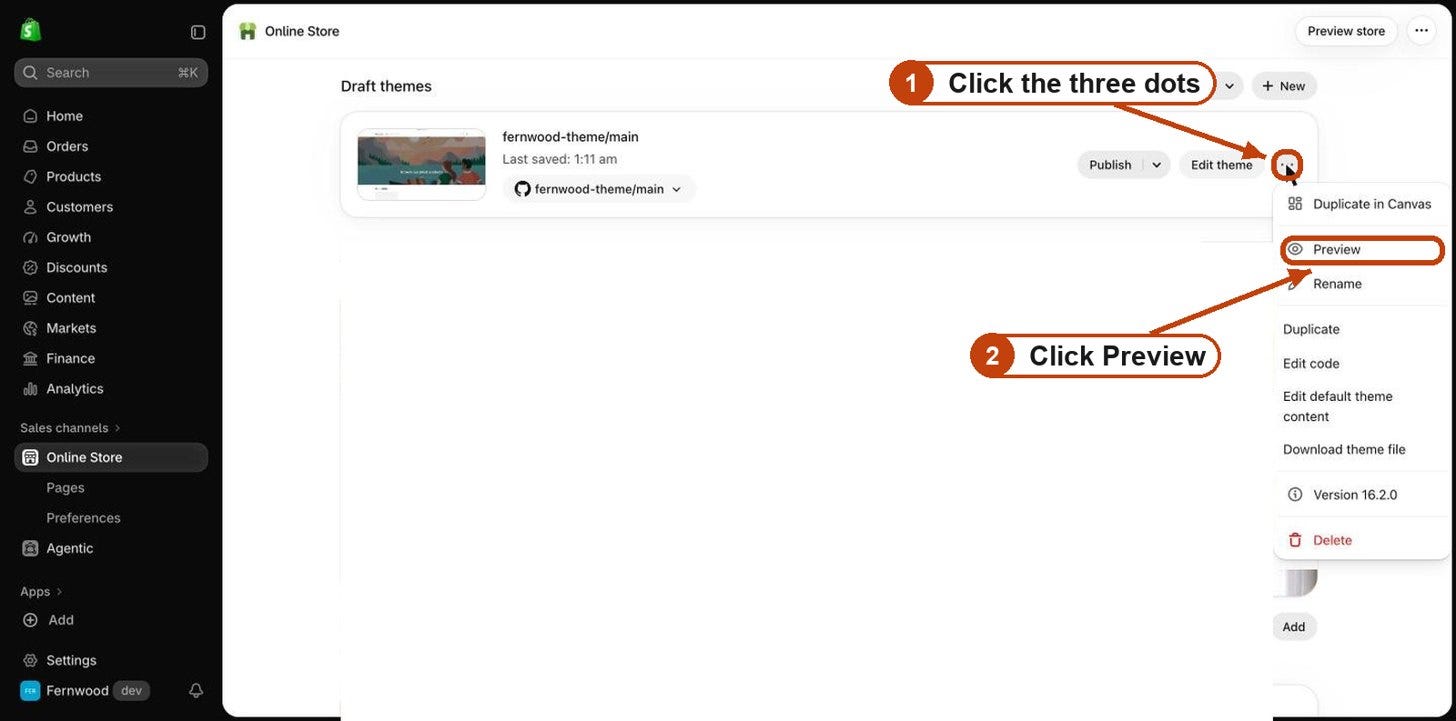
Save everything to GitHub. Never publish. Tell me exactly where to click to see the product page itself.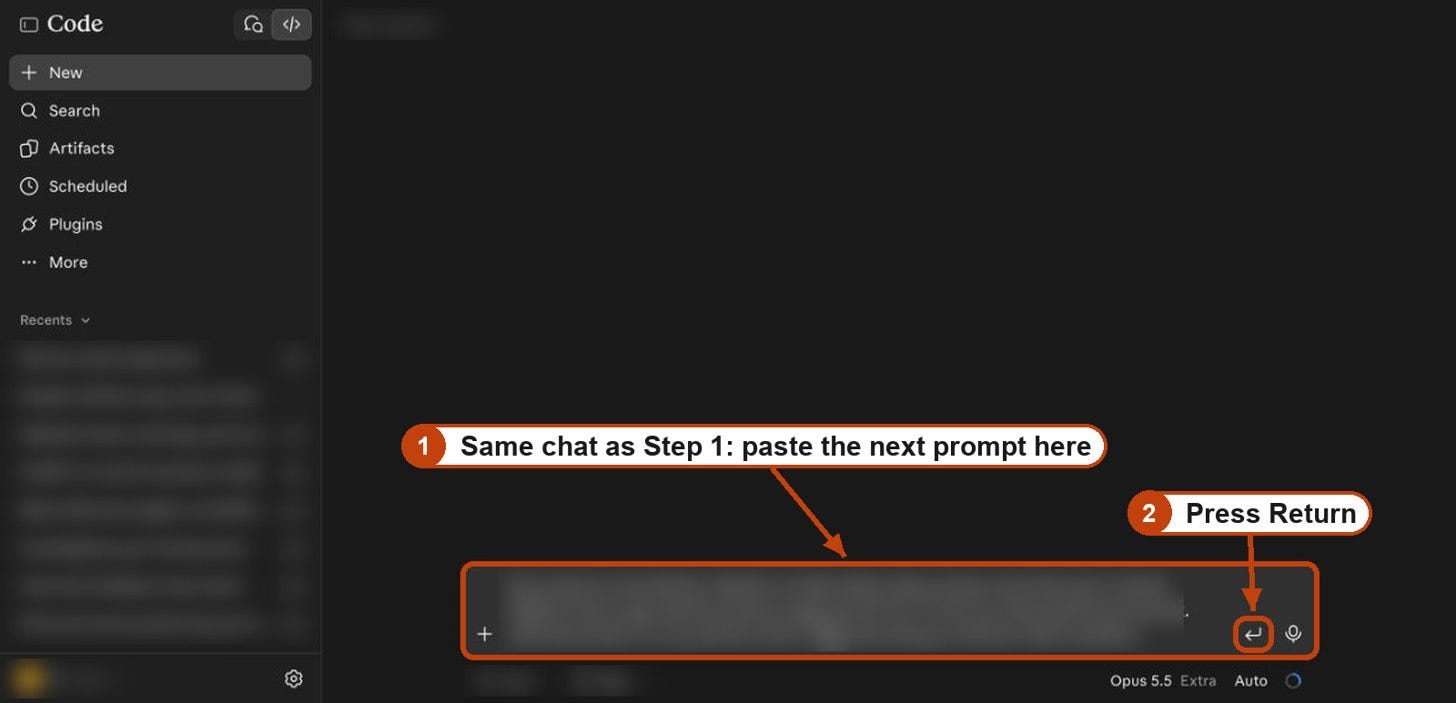
Step 7. Look at it like a shopper
You see the page on your own phone and tell Claude what to change in plain words.
One or two times a day I'm like, "Oh yeah, I should just go into Claude Code or Claude design and be like, hey, make the mobile versions," and then come back 10 minutes later and then they're done.
Just drop this into Claude:
On the product page, make the title bigger on phones and move the buy button above the description. Show me the draft before anything else, and tell me where to find the store password my phone will ask for.How I redesigned the home page and product page in the chat
Just drop this into Claude:
I think we should make a more fancy modern looking homepage and product page with more CRO optimizations so the article [can] show someone a pretty sick looking design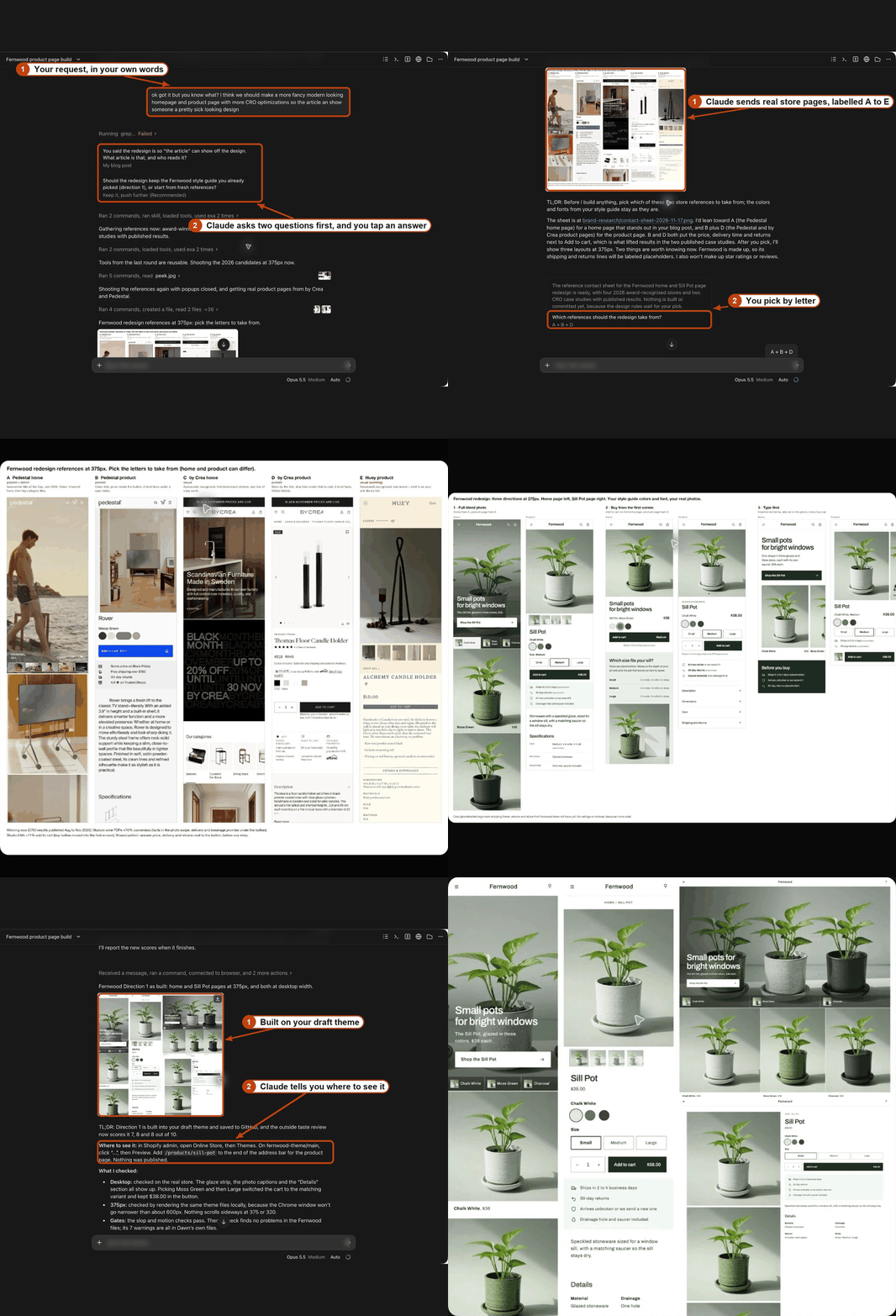
Step 8. Add photos if you don't have any
You get product photos made by AI, in the same style every time, with no photo shoot.
None of the product photos on this store were shot. You could take a few different images that you already have and then ask AI to turn it into JSON, and then put that into Gemini plus drag in a few of the reference images. And then it can just, boom, start making those base images.
You don't have to pay a monthly fee, you just pay as you go.
Just drop this into Claude:
I need product photos. Walk me through getting a Google Gemini API key one click at a time: open aistudio.google.com/apikey for me, tell me exactly what to click, and tell me if I have to turn on billing. Then open a small window on my computer that asks for the key, where I paste it myself without using the terminal, and save it in a .env file that never goes to GitHub. Never ask me to paste the key in this chat. Then write my photo style in a file called photo-style.md, make one master photo of [product] with an image model like Kling or Google's Nano Banana, and show me the price before you spend anything. Save that photo's look in a file called photo-style.json, and make every later picture from the master photo plus that file, so the product keeps the same shape and glaze in every picture. Then add the photos to my product in my practice store, or walk me through adding them one click at a time if you can't, and show me the page.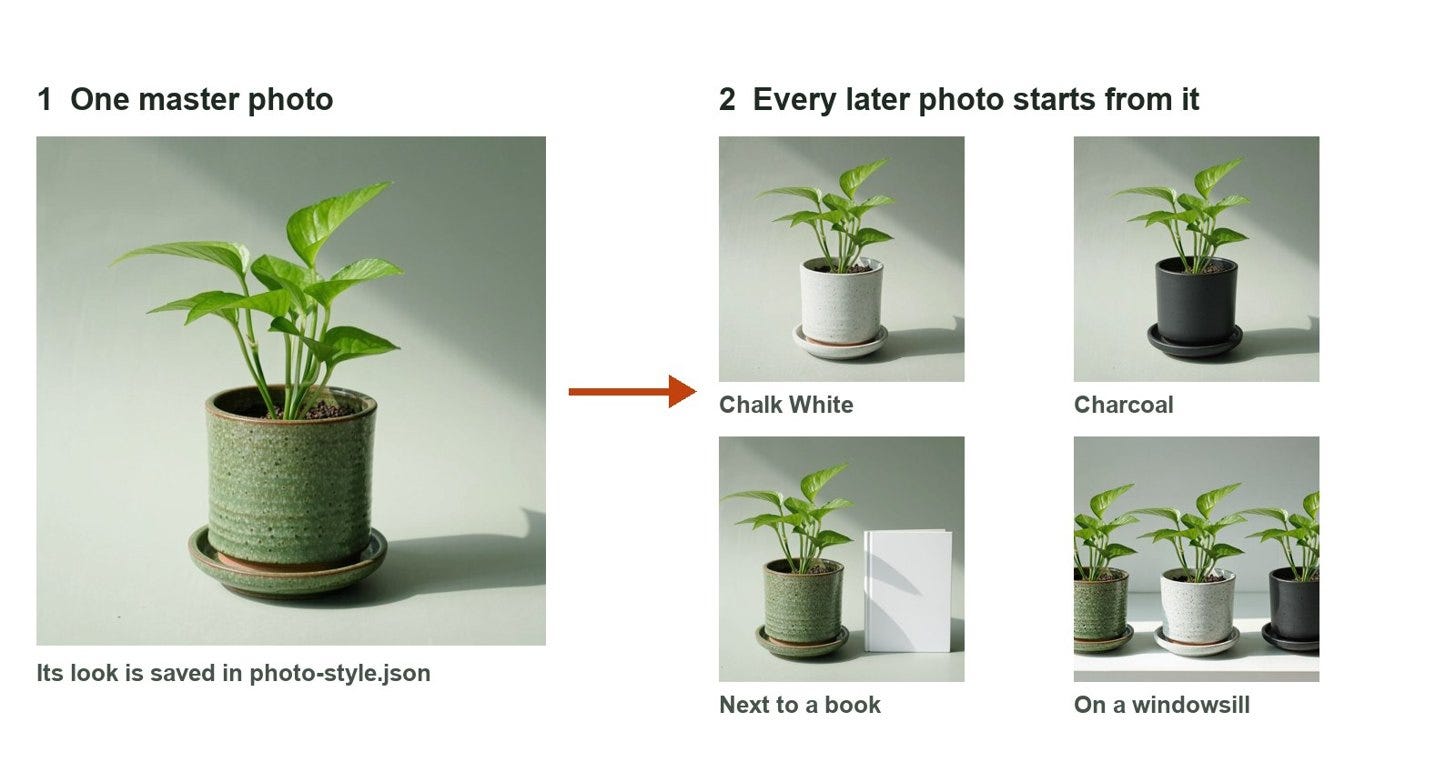
Step 9. Have Claude watch your store
Claude checks your real store every morning and posts what broke to Slack.
I was working with a developer a few weeks back, and they pushed some change to the site, and it broke the ability to buy one-time. You could only buy on subscription, and it was like that for 7 days. I didn't realize. And then I noticed, and I was like, "Hey, this last code change that you guys made, I guess it stripped the ability to buy one-time, and now I need you guys to fix it quickly." And no one was answering me. So I went into Claude, and I was just like, "Hey, fix this." It took like 3 minutes.
I have other automations too, like here's a store that I have where every morning it posts what happened on the site yesterday.
Just drop this into Claude:
Set up a daily check of my real store at [the web address shoppers use]. If the store has a password, have me paste it into a small window on my computer that asks for it, not this chat. Every morning at 8, open the home page, one collection, my best seller and the cart at computer, tablet and phone sizes. Check that pictures load, nothing is wider than the screen, each page loads in under 4 seconds, and add to cart works. Never go to checkout. Install anything you need yourself. Then walk me through making a Slack incoming webhook one click at a time, have me paste it into a small window on my computer that asks for it, not this chat, and post a short report to Slack with only what changed since yesterday. If adding the webhook needs a Slack admin's approval, tell me exactly what to ask them for. Tell me where to find this check in the app, and whether it still runs when my computer is off, and if not, how to fix that.This is the top of a real report:
Site check. Pages: 4. Screen sizes: desktop, tablet, phone.
All 12 checks passed.

Not found on your product pages:
- a star rating or review count

Load time     desktop   tablet   phone
/             1.2s      1.5s     1.4s
/cart         1.0s      1.0s     1.0s
I barely ever even go into PostHog. I normally just have Claude connect to PostHog and I ask my questions and have it pull the data I need, so I'm not poking around the software myself. It shows places where people are rage-clicking, or where sessions are hung, and it heat maps the site. And I'd be looking at those session recordings to see how people are interacting with the page, and then making decisions on what kind of improvement I might want to make, whether it's adding a comparison chart or changing copy.
My recipe does all 10 steps in this post for you. The recipe is a prompt starter for Claude Code, and paid members get it.
Step 10. Move to your real store
Claude copies your real store's theme to a draft, so you can make every change from this guide without touching the live site.
Use the taste vault to come up with a new landing page, it'll go implement that on a draft theme, I test it, and then I push it to the main theme.
Just drop this into Claude:
Connect to my real store with the Shopify CLI. If I only know its own web address, find its myshopify.com address for me, and ask me to say ready before you open the approval page. Download a copy of my live theme without changing it and save it to a new private GitHub repo. Then walk me through connecting that repo to my store one click at a time, the same way as Step 4, so it shows up as a draft theme, and include giving the Shopify app on GitHub access to this new repo. Make every change on that draft and never publish. Tell me where to click to preview it. If I'm not the store's owner, tell me what access I need to ask for first.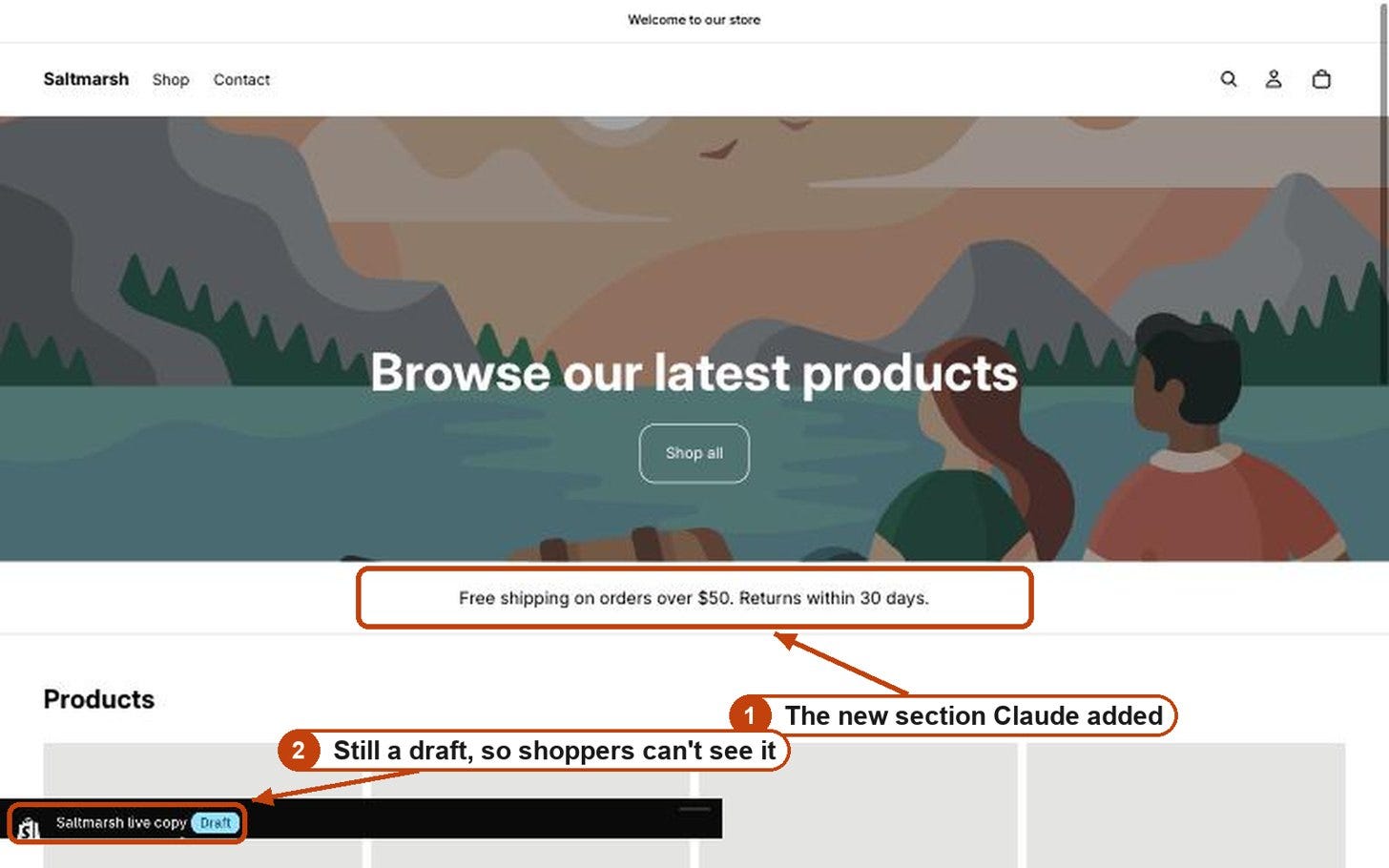
Get the recipe that does all of this for you
My recipe is a prompt starter for Claude Code. Claude reads the recipe and does all 10 steps for you, and you do not need to know code.
Upgrade to the Growth Operator paid tier. After you upgrade, the rest of this post shows you how to get the recipe. Then you give Claude Code the recipe, and Claude does all 10 steps and asks you yes or no along the way.